------------------> Search Here <-----------------

Showing posts with label photography. Show all posts

Wednesday, August 29, 2012

CameraPro (CameraX) 2.0 APK Free Download


Description

Professional Photography App for Android
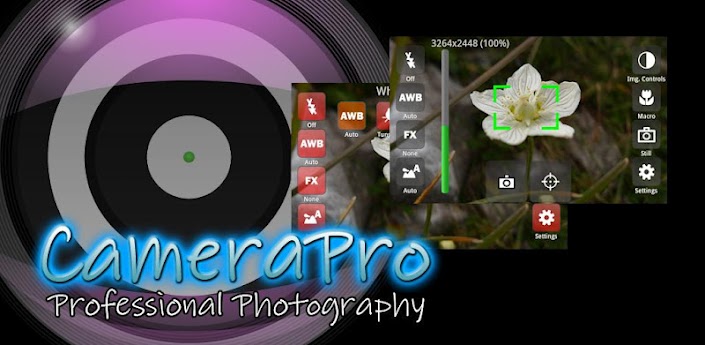
CameraPro (previously known as "CameraX") offers fast access to your mobile's camera capturing and video recording features. It is highly customizable including different designs and menu arrangements. Pictures can be directly uploaded from CameraPro to Facebook, Flickr, Picasa, and Twitter.
The following list gives an overview over the features. PLEASE NOTE that features marked with "*" vary between different phone models!
Camera Modes:
- Still (normal mode)
- !!!BETA!!!: Video / expert video mode (HD video greater than 720x480p is in Beta and works only on some phone models)
- Self-timer
- Time-lapse: record time-lapse picture series (Android 3.0+: record time-lapse videos too)
- Burst: shoot a set of pictures as fast as the phone supports
- Bracketing: take up to 10(!) different exposed images (can be used for HDR stitching with other apps)
- Anti-shake: take pictures exactly in the moment when the phone is not moving
Picture contols:
- Focus (autofocus, macro, infinity, continuous autofocus, face detection,...)*
- White balance*
- Flash (including videolight)*
- Effects (such as mono, negative, solarize, aqua,...)*
- Scene modes (night, landscape, portrait, beach, snow, fireworks, sports, party, candlelight, text,...)*
- Image controls (exposure compensation, brightness, contrast, sharpness, saturation)*
- ISO*
- Metering mode*
- Antibanding*
Overlays
- Grid (customizable)
- Level meter/virtual horizon with indicator*
- Compass*
- Touch focus (Android 4+)*
- Zooming*
Expert video mode (excerpt)
- Automatic bypassing of recording time respectively file size limit by means of file splitting (short gap possible between files)
- Disable audio recording
- Adjust audio channels, sampling rate, audio/video bitrates, frame rates, audio/video codecs, video container format, video dimensions*
- Supports 1080p video recording (e.g. Galaxy S2)*
Settings (excerpt)
- Use volume keys, hardware shutter, trackball, and touch buttons for capturing and focusing*
- Set CameraPro as default camera app*
- Disable shutter sound
- Fullscreen viewfinder*
- Back/front camera (front camera does not support video recording yet)*
- Image compression quality
- Different arbitrary storage locations for video and photos including customizable filenames
IMPORTANT LIMITATIONS
- For video resolutions greater than 720x480 set focus mode to "Continuous" if available. Else recording might start delayed (app looks as if it hangs for some seconds on the Samsung Galaxy S2)
- Zooming and picture controls can only be modified BEFORE video recording
- Changing from continuous autofocus to some other focus mode can be very slow
- Sometimes the direct HD video preview in the video player (started from CameraPro) shows only a black screen. When the player is started manually the video play back is fine.
- If updating from CameraX fails, uninstall CameraX before installing CameraPro.
- Video recording on some HTC devices and on all devices with Android 2.2 and older is only partly supported
HTC/Distorted Pictures:
- Some still picure resolutions on some HTC devices are distored (e.g. 16:9 resolutions). Enable the "HTC fix" under settings to fix.
LG/Viewfinder orientation:
- On some devices the viewfinder orientation is wrong (e.g. LG P500). Enable "Orientation fix" under settings to fix.


Thursday, August 16, 2012

HDR Camera+ APK FREE DOWNLOAD


Description

Take images with vivid colors and rich detail. High quality full resolution HDR!
FREE FOR MOBI2K.BLOGSPOT.COM
Full featured and fast HDR camera for Android:
- Full resolution
- Real HDR: exposure bracketing and tone mapping
- Simple: take a HDR image in one tap
- HDR images fused and tone mapped on device within seconds
- Hand shake compensation, no need to be rock-solid while shooting
- Correct handling of moving objects, de-ghosting
- You can control tone-mapping parameters: contrast, micro-contrast, color vividness, exposure
- Save original exposure bracketed images
- Location tagging
- Shutter sound can be muted (not on all models)
- Support for Flash on/off/auto
Join HDR fans and share your photos on facebook: http://facebook.com/hdrcamera
Join us and share your stunning HDR photos at Flickr:http://www.flickr.com/groups/1820156@N20
Why HDR
------------
Real life scenes often have a wide range of light intensity, which cannot be captured by a camera. In a photo of such a scene the bright areas look washed out and everything in shadows is pictured as a black spot with no details. The HDR technique allows you to capture details in bright and dark areas and have them merged in a single photo.
HDR photography is widely adopted by professional photographers. Wouldn't it be nice to have an HDR in mobile phones?
The problem is that HDR requires taking several differently exposed images in series, which must be precisely aligned and then fused. In order to be usable for real life scenes, the HDR feature should include moving object detection and hand shake compensation to avoid or minimize the ghosting in the final image. That requires a lot of computational resources and makes a challenge even for professional desktop HDR software.
Almalence has brought its expertise in professional HDR software to mobile phones. Our HDR fusion algorithms compensate hand shaking and detect moving objects in the scene, suppressing ghosting artifacts. At the same time, the algorithms are quick enough to provide comfortable processing time on mobile devices.


User Ratings

5 star  1,312
4 star  495
3 star  159
2 star  90
1 star  129
Average rating:
4.3
2,185


Wednesday, July 18, 2012

PRO Zoom Camera 5X APK Free Download


Description

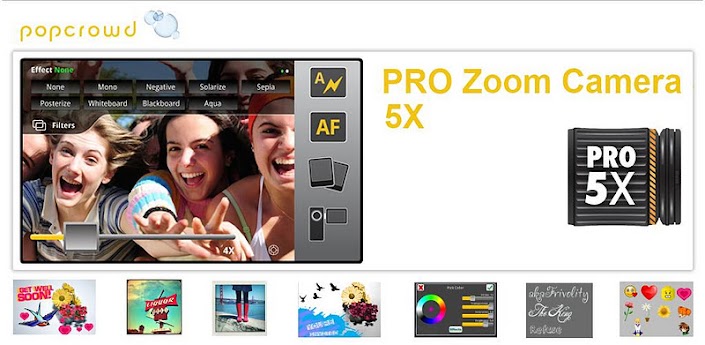
Replace default camera app with 5x ZOOM, 5 whitebals, 27 filters & crazy effects
Want to take better pictures?
READY for: Droid/Nexus/Hero/Eris/Galaxy S + more!
5x ZOOM, 5 whitebalances, 8 filters & front camera support
Full editor:
+draw or paint on your photo
+53 cliparts included
+21 great fonts
+23 hipstamatic effects, more than Instagram
+brightness & contrast control
+time delay camera
+macro focus
+front camera support
+flash control (flash is req)
+silent no sound mode
+geotag your photos
+EXIF data recorded in Jpeg
+Load existing photos to edit


Saturday, July 7, 2012

Paper Camera Apk Free download


Description

See the world through a novel, original, stylish and captivating lens.
Real time cartoon and painting effects displayed on your camera feed! See the world through a new, original, stylish and captivating lens, have a wonder in your own home and discover how cool is now your world in cartoon!
This is the ultimate collection of cartoon/sketch/comic book/half tone/noir/neon and many other effects painted directly in your camera, no more boring post-effects, it's all real time, you simply won't stop wandering, wherever you are, having a look at things and cartoon-ize them!
You can wave your phone around and see the world change before your eyes, take pictures using any of the stylish cartoon effects or apply them to your existing photos

VIDEO FAQ:
● How can I play Paper Camera videos on my PC?
Using any WebM player. We recommend Firefox or Chrome, however you might be able to use Windows Media Player or Internet Explorer if you install the right plugins.
● I can't play Paper Camera videos on my standard device gallery.
You require Android 4.0 or higher for this to work, on older versions you can use the in-app video player.
● I can't record video with Paper Camera on my new device, why?
We've only enabled this feature on devices that we know can support it properly. However you can still try using unofficial video recording support.
● How do I enable unofficial video recording support?
In the settings menu. Let us know if this works properly on your device and we will officially enable it in future versions. Please note that you will have to be running Android 2.3.3 and have support for NEON instructions for this to work at all.
● I've unlocked unofficial video support but I cannot playback my videos in Paper Camera, why?
This is a known limitation on some devices, there are 3 workarounds for this:
- You can playback videos on your PC.
- You can use MX Video Player, if you enable software mode.
- Hopefully when your device will receive a 4.0 upgrade this issue will be fixed

Related Posts Plugin for WordPress, Blogger...

Share

Twitter Delicious Facebook Digg Stumbleupon Favorites More